

Bring New File back to the Finder right-click menu
Back to apps

Mac
iPocket NewFile
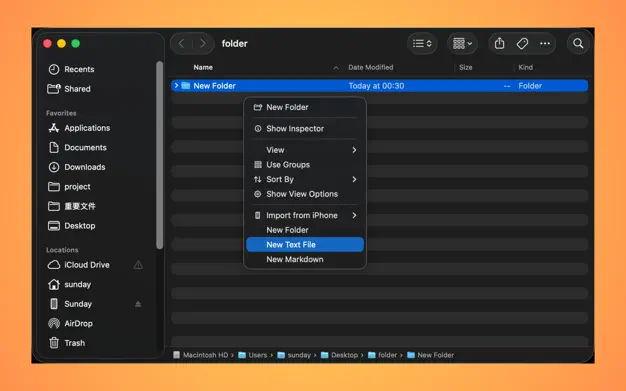
iPocket NewFile is a macOS Finder companion that brings New File back to the right-click menu, keeps your favorite file types close, and lets you save reusable templates for daily work.
First published · 2026-04-10
Last updated · 2026-04-10
SCREENSHOTS
SCREENSHOTS
FEATURES
FEATURES
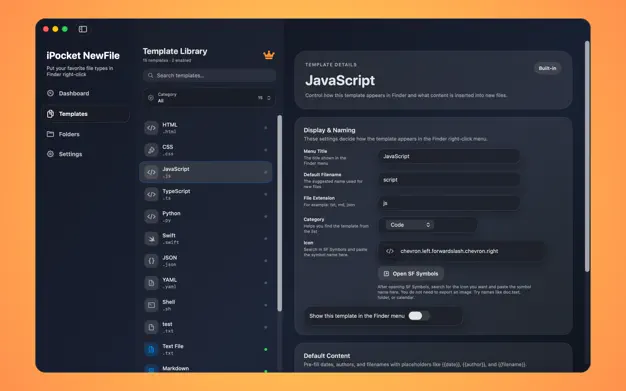
Keep built-in and custom templates ready for one-click creation
Show the menu only inside the folders you choose
Pre-fill dates, authors, and filenames with template placeholders
Unlock Pro for unlimited custom templates with a lifetime purchase
FAQ
FAQ
What does iPocket NewFile do?
It adds a New File experience back to Finder. After setup, you can right-click in Finder and create common files from templates instead of starting from a blank document every time.
How does the Finder menu know where to appear?
The app uses monitored folders. Add the folders you care about, such as Desktop, Documents, or project directories, and the Finder extension shows the menu only in those places.
What can I put inside a template?
Templates can include fixed text, starter code, meeting notes, and placeholders like {{date}}, {{author}}, and {{filename}} so each new file starts with the right structure.
Why might the menu not appear at first?
Usually the Finder extension still needs to be enabled in System Settings, or the current Finder location has not been added to monitored folders yet. The app dashboard helps you check both.
What does Pro unlock?
The app includes built-in templates out of the box. Pro unlocks unlimited custom template creation, so you can add your own document, code, and workflow presets with a one-time lifetime purchase.