

Bring New File back to the Finder right-click menu
Back to apps


- Mac
iPocket NewFile
iPocket NewFile is a macOS Finder companion that brings New File back to the right-click menu, keeps your favorite file types close, and lets you save reusable templates for daily work.
First published · 2026-04-10
Last updated · 2026-04-10
Screenshots
Features
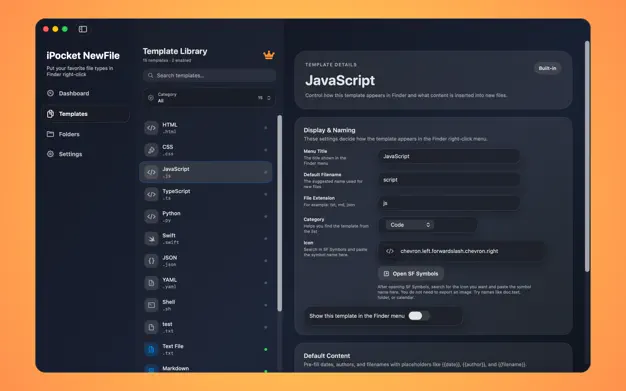
Keep built-in and custom templates ready for one-click creation
Show the menu only inside the folders you choose
Pre-fill dates, authors, and filenames with template placeholders
Unlock Pro for unlimited custom templates with a lifetime purchase
Overview
What is iPocket NewFile?
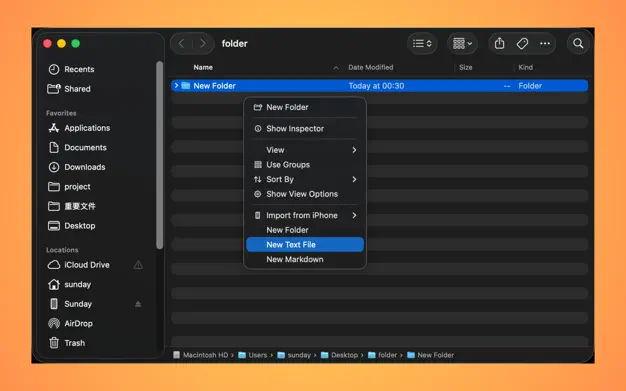
iPocket NewFile restores a Finder New File menu on macOS. Instead of creating a blank document in another app and saving it into the right folder, you right-click in Finder and create common files from templates—Markdown, notes, code stubs, or your own presets.
It is a small Finder companion for people who live in project folders and want one-click structure rather than empty files.
Who it is for
- Mac users who miss a right-click New File workflow from other platforms
- Developers and writers who reuse document or code templates
- Anyone who wants the menu only in chosen folders (Desktop, Documents, project dirs)
- Teams that want placeholders like date, author, and filename filled automatically
How to create a new file from Finder
- Install iPocket NewFile and enable the Finder extension in System Settings if prompted.
- Add monitored folders in the app dashboard (for example Desktop, Documents, or a project root).
- Open Finder in one of those folders, right-click, and choose New File.
- Pick a built-in or custom template. Placeholders such as
{{date}},{{author}}, and{{filename}}expand into the new file. - Start editing immediately in your preferred app.
If the menu does not appear, confirm the extension is enabled and that the current location is in monitored folders.
Templates that match real work
Templates can hold fixed text, starter code, meeting-note layouts, or mixed content with placeholders. Built-in templates cover everyday cases; Pro unlocks unlimited custom templates with a one-time purchase so you can encode your own workflows.
Privacy and local design
NewFile runs on your Mac and focuses on Finder integration and local templates. There is no requirement to create an account to create files in the folders you already use.
FAQ
What does iPocket NewFile do?
It adds a New File experience back to Finder. After setup, you can right-click in Finder and create common files from templates instead of starting from a blank document every time.
How does the Finder menu know where to appear?
The app uses monitored folders. Add the folders you care about, such as Desktop, Documents, or project directories, and the Finder extension shows the menu only in those places.
What can I put inside a template?
Templates can include fixed text, starter code, meeting notes, and placeholders like {{date}}, {{author}}, and {{filename}} so each new file starts with the right structure.
Why might the menu not appear at first?
Usually the Finder extension still needs to be enabled in System Settings, or the current Finder location has not been added to monitored folders yet. The app dashboard helps you check both.
What does Pro unlock?
The app includes built-in templates out of the box. Pro unlocks unlimited custom template creation, so you can add your own document, code, and workflow presets with a one-time lifetime purchase.
MORE FROM IPOCKET
Related apps
-
 FileTrailMac
FileTrail is a macOS file-tracking utility that records newly added files in the folders you choose, keeps a searchable local history, and gives you fast ways to reveal the latest file from the menu bar or Finder.
View app -
 iPocket ClearMac
iPocket Clear is a native macOS app uninstaller that scans leftovers before cleanup, reviews protected data, and removes apps and related files in one guided flow.
View app -
 iPocketXLIFFMac
iPocketXLIFF is a smart XLIFF localization editor for Apple developers, featuring AI-assisted translation and seamless Xcode integration.
View app